Dear users, as the saying goes “Data is the Gold of the 21st Century”, in today’s blog post, we would like to showcase improvements in how you can get your data out of AiiDA’s internal storage. We hope that these new features will enrich not only you, but also the science you conduct.
Dumping process data to disk
From AiiDA’s internal storage to classical directory trees
As you might be aware, AiiDA uses an SQL database, as well as an internal file repository 1 to store your data locally 2. Both are optimized towards high performance and therefore constructed to be machine-readable rather than human-readable. Hence, the difference between AiiDA’s internal data storage and the typical file-system approach (that most of us are familiar with) can make it cumbersome to get your data out of AiiDA onto your file system in an easily understandable form.
Therefore, you, the user, are effectively forced to use the verdi CLI interface or AiiDA’s Python API (e.g. the
QueryBuilder class) to access your data, making the transition towards AiiDA more challenging. To ease this
transition, we have added
functionality to dump
AiiDA Process data to disk in an intuitive directory structure via:
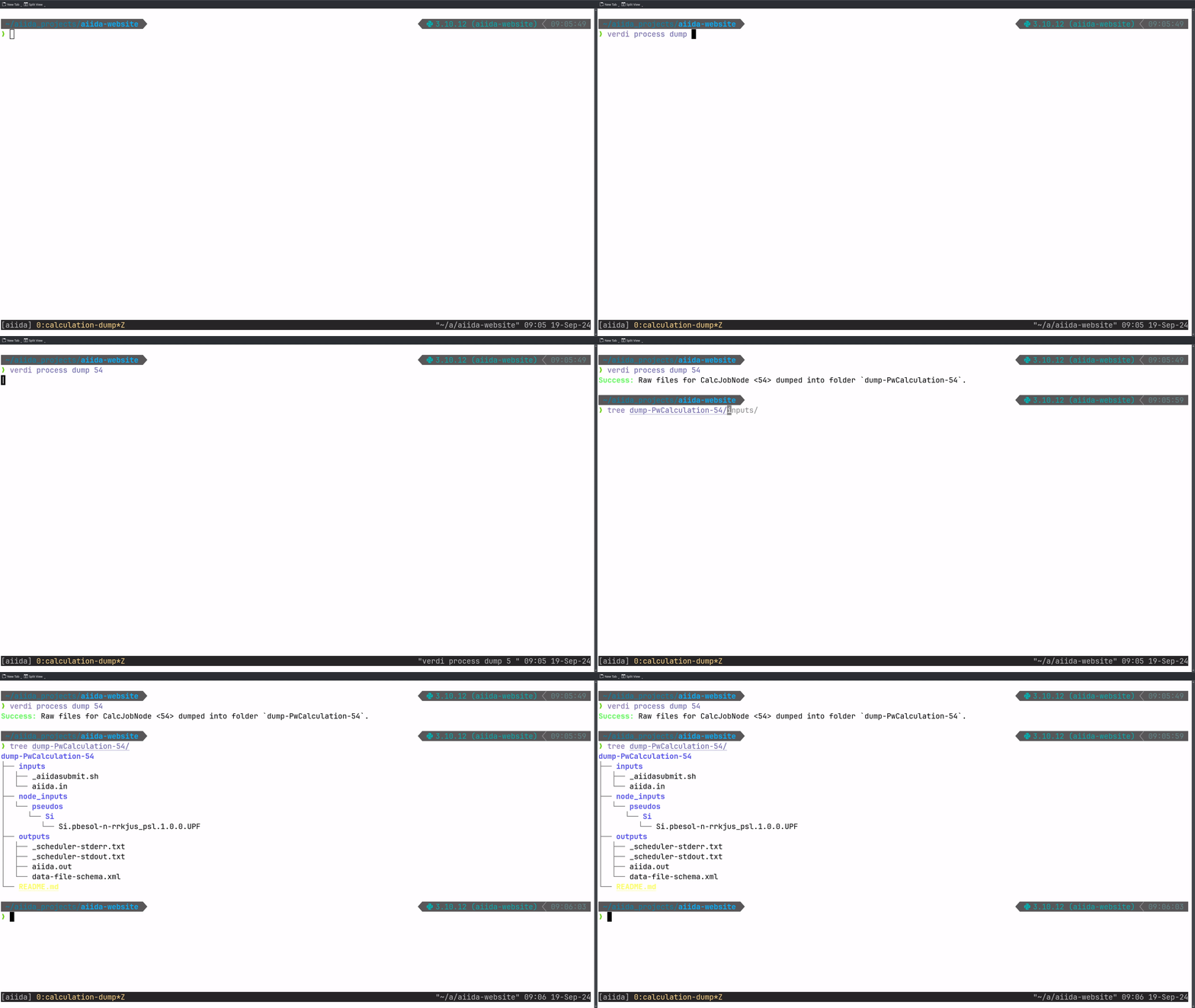
verdi process dump <pk>The following video shows the result of running the command for a PwCalculation that was used to execute the pw.x
executable of Quantum ESPRESSO:
And for a more complex PwBandsWorkChain (which actually contains the previously shown PwCalculation as one of its steps):
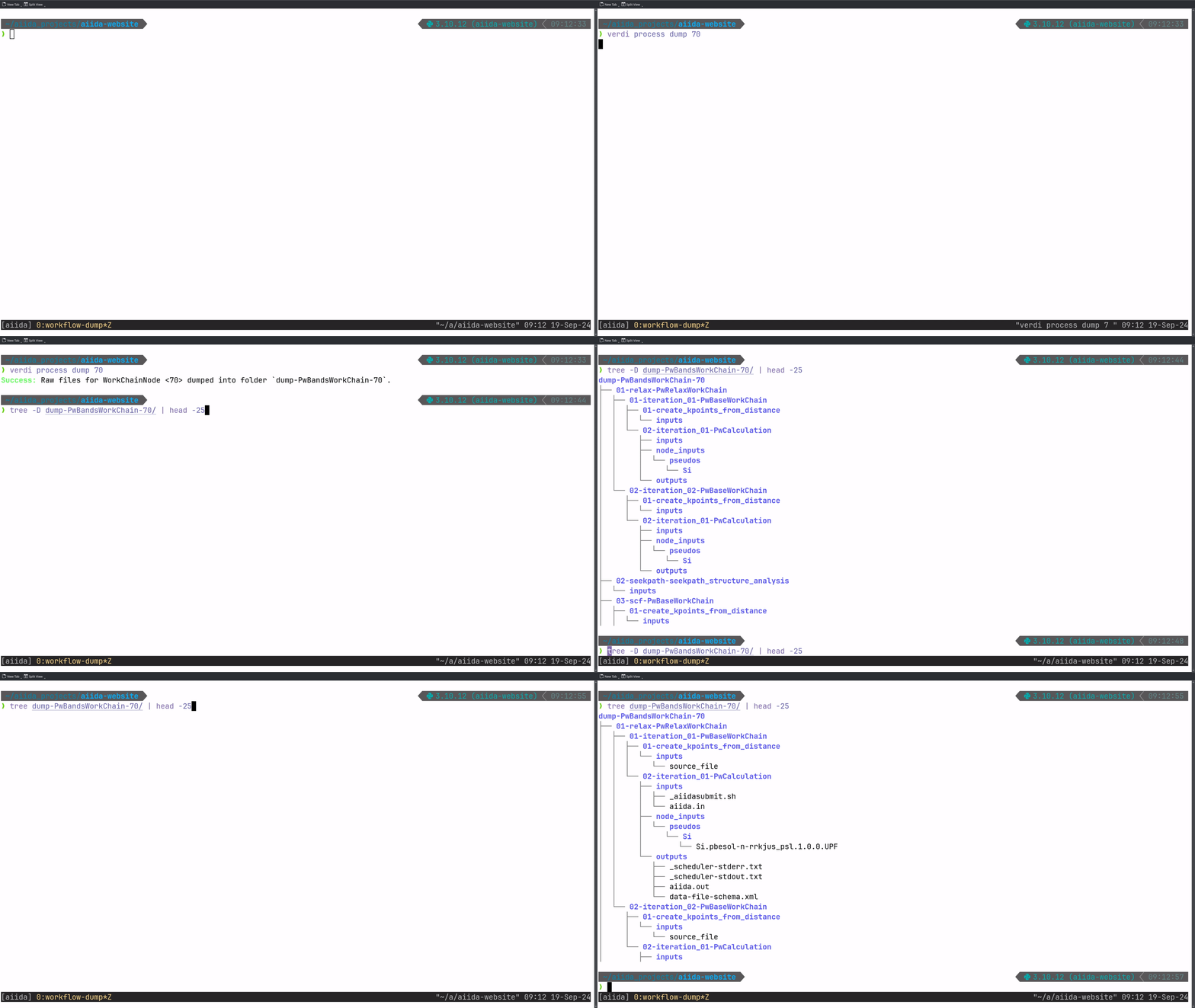
As you can see, the command works both for individual calculations and for nested workflows, resulting in the following output directories 3.
tree on a dumped example CalcJob:
dump-PwCalculation-54
├── README.md
├── inputs
│  ├── _aiidasubmit.sh
│  └── aiida.in
├── outputs
│  ├── _scheduler-stderr.txt
│  ├── _scheduler-stdout.txt
│  ├── aiida.out
│  └── data-file-schema.xml
└── node_inputs
   └── pseudos
      └── Si
         └── Si.pbesol-n-rrkjus_psl.1.0.0.UPF
tree -d on a dumped example WorkChain:
dump-PwBandsWorkChain-70
├── 01-relax-PwRelaxWorkChain
│  ├── 01-iteration_01-PwBaseWorkChain
│  │  ├── 01-create_kpoints_from_distance
│  │  │  └── inputs
│  │  └── 02-iteration_01-PwCalculation
│  │     ├── inputs
│  │     ├── node_inputs
│  │     │  └── pseudos
│  │     │     └── Si
│  │     └── outputs
│  └── 02-iteration_02-PwBaseWorkChain
│     ├── 01-create_kpoints_from_distance
│     │  └── inputs
│     └── 02-iteration_01-PwCalculation
│        ├── inputs
│        ├── node_inputs
│        │  └── pseudos
│        │     └── Si
│        └── outputs
├── 02-seekpath-seekpath_structure_analysis
│  └── inputs
├── 03-scf-PwBaseWorkChain
│  ├── ...
...
Therefore, after running the command once, you’ll have all data involved in the execution of your workflow directly accessible as a standard folder 4. This allows you to explore it with your favorite file explorer or command-line tool.
Happy grepping!
New QueryBuilder Syntax
SQL queries, but intuitive!
In addition to accessing raw files as outlined above, AiiDA’s powerful SQL database allows querying for stored nodes,
which can be achieved with the QueryBuilder class (as documented
here). While using the QueryBuilder is
(at least for most of us) easier than writing raw SQL queries, its syntax typically requires some familiarization 5.
Recent improvements have therefore enabled an alternative, more intuitive way to construct queries. Let us explain with
the following example: Assume you wanted to obtain all integers with values in a range between 1 and 10 (both excluded)
from a Group called “integers”, and return their respective PKs and values. To achieve this, you’d have to construct
the following, rather convoluted query:
from aiida import orm

qb = orm.QueryBuilder()
qb.append(
    orm.Group,
    filters={
        "label": "integers",
    },
    project=["label"],
    tag="group",
)
qb.append(
    orm.Int,
    with_group="group",
    filters={
        "and": [
            {"attributes.value": {">": 1}},
            {"attributes.value": {"<": 10}},
        ]
    },
    project=["pk", "attributes.value"],
)
In the code snippet above, we first import AiiDA’s object-relational
mapping (orm) module, and then instantiate the
QueryBuilder class. The query is then gradually built up by adding the desired specifications using the append
method. Here, we first apply filtering for groups that are labelled “integers” and tag this filter as “group” so that we
can link it with the second append. In this second call of the method, we only filter for integers of AiiDA’s integer
data type (orm.Int) that are part of our previously defined group via with_group="group". We then apply the filter
that the values of the integers should be in our desired range between 1 and 10, and, lastly, using
project=["pk", "attributes.value"], we only return the primary keys and actual values of the AiiDA orm.Int nodes we
obtain from our query (rather than, say, the entire AiiDA Node instance).
Instead, the new QueryBuilder syntax allows accessing attributes of AiiDA nodes via the new fields
specifier,
with which the filtering logic can be applied to them directly:
from aiida import orm

qb = orm.QueryBuilder()
qb.append(
    orm.Group,
    filters=orm.Group.fields.label == "integers",
    project=[orm.Group.fields.label],
    tag="group",
)
qb.append(
    orm.Int,
    with_group="group",
    filters=(orm.Int.fields.value > 1) & (orm.Int.fields.value < 10),
    project=[orm.Int.fields.pk, orm.Int.fields.value],
)
Hence, for example the filter on the values of the integer nodes reduces from:
filters={
    "and": [
        {"attributes.value": {">": 1}},
        {"attributes.value": {"<": 10}},
    ]
}
to the more concise:
filters=(orm.Int.fields.value > 1) & (orm.Int.fields.value < 10),in which the "and" condition can be expressed via the ampersand (&) and directly be applied on the relevant
entities. Furthermore, accessing through the .fields attribute, e.g. in the updated project specifier:
project=[orm.Int.fields.pk, orm.Int.fields.value]albeit being slightly more verbose, is less prone to errors than access via string identifiers in the previous version:
project=["pk", "attributes.value"]as it allows for autocompletion.
Any feedback on the new QueryBuilder syntax welcome!
Relevant PRs
For the more tech-savvy among us, here are the relevant PRs of the changes outlined in this blog post:
- [#6276] Add CLI command to dump inputs/outputs of
CalcJob/WorkChain - [#6245] ✨ NEW: Add
orm.Entity.fieldsinterface forQueryBuilder(cont.) [and linked PRs]
Footnotes
Footnotes
-
The file repository is based on the
disk-objectstoreimplementation. If you ever wondered what the_dosappendix of thecore.psql_dosandcore.sqlite_dosstorage backends means, now you know! 😉 ↩ -
The discussion in the main text of this blog post refers to the files and data stored by AiiDA on the local computer where AiiDA is installed, and which are preserved long-term in its internal file repository. These files are obtained, e.g. by retrieval from the remote computer once a calculation finishes, or could be parsed data or inputs provided by the user. Instead, during the execution of your calculations on the remote computer, files are located in a subfolder of the
work_directoryof the usedComputer(typically in thescratch), where the subfolder name is generated from the UUID of the AiiDACalculationNode. This directory has a three-level depth, obtained by “sharding” the UUID based on the first characters. For istance, if the UUID is6861d8fb-4694-46be-b0e6-7282989f069d, the calculation will run in a subfolder named68/61/d8fb-4694-46be-b0e6-7282989f069d. ↩ -
The workflow is recursively traversed, and files are written to disk for each calculation (remember, it’s the
Calculationthat actually creates the data, while theWorkflowcan only return it, as outlined here). In theverdi process dumpfeature, the subdirectory naming is automatically determined based on the iteration counter, the link label, and the class name, leading to a directory structure that mirrors the execution logic of the workflow. ↩ -
The
verdi process dumpfeature is currently still actively developed to enable obtaining remote and stashed data entities, e.g., intermediate files of the workflow that weren’t originally retrieved from the remote (high-performance) computer or data that was moved to tape. In addition, we are working on allowing todumplarger collections of data, such as groups, or even all data contained in an AiiDA profile, again, in an easily understandable folder structure. So stay tuned! ↩ -
Modern LLMs like ChatGPT and Claude can actually generate (somewhat correct) AiiDA
QueryBuilderqueries (at least with the syntax until their training data cutoff date), so they can provide a good starting point for your queries. ↩